Preemptive Scheduling
This project helps you understand the scheduler of egos-2000. Most of the egos-2000 scheduler logic is in the proc_yield function in grass/kernel.c, which, similar to the thread_yield function in P1, selects the next thread to be scheduled when the current thread yields. However, egos-2000 has a preemptive scheduler, meaning that the current thread is forced to yield even if it does not directly invoke the yield function. This is made possible by timer interrupts, so we start by introducing what a timer is.
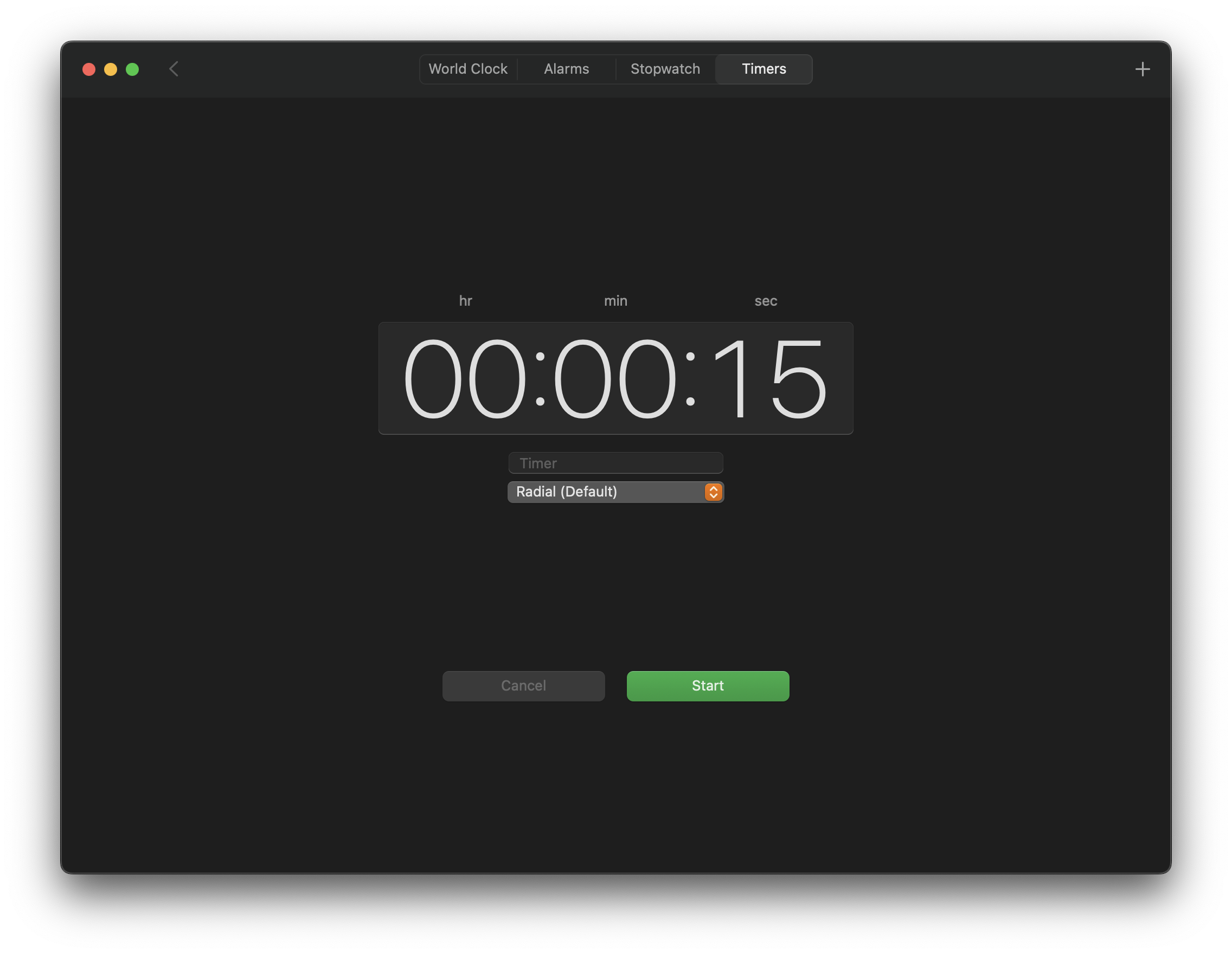
This screenshot is a timer in MacOS. You can set the timer to a value (e.g., 15 seconds) and start it. When this time period has elapsed, the timer will raise an interrupt (e.g., the Radial ringtone). This project shows you how to do something similar within a CPU: instead of raising ringtones, the CPU sets the program counter to the code of a special function when the time period has elapsed. This special function is called an interrupt handler, which will further invoke proc_yield, switching the CPU context to a different thread in egos-2000.
TIP
We do not distinguish thread and process for now, so you can simply regard the struct process and proc_yield from egos-2000 as the struct thread and thread_yield from P1. We start to distinguish the two when introducing virtual memory in P4.
Timer interrupt
We start by explaining the following demo program, which prints Got a timer interrupt. repeatedly every QUANTUM time units. The time unit here is 10^-7 seconds.
#define QUANTUM 10000000

int main() {
    /* Register the handler. */
    asm("csrw mtvec, %0" ::"r"(handler));

    /* Set a timer period. */
    mtimecmp_set(mtime_get() + QUANTUM);

    /* Enable timer interrupt. */
    asm("csrs mie, %0" ::"r"(0x80));
    asm("csrs mstatus, %0" ::"r"(0x8));

    /* When a timer interrupt is raised, the CPU behaves as if a
       call to function handler() is added to this while loop. */
    while(1);
}

void handler() {
    printf("Got a timer interrupt.");
    mtimecmp_set(mtime_get() + QUANTUM);
    /* When invoking mret, the CPU behaves as if handler()
       is returning to the while loop in function main(). */
    asm("mret");
}Register the handler
The first line of the main function registers handler() as the interrupt handler. The syntax might look a bit scary, but its job is actually very simple.
First, mtvec is a Control and Status Register (CSR), meaning it serves special purposes unlike general-purpose registers. The special purpose of mtvec is to hold the interrupt handler's starting address. In other words, the CPU would set the program counter to the value stored in mtvec upon receiving an interrupt. You can learn more about mtvec in Chapter 3.1.7 of the RISC-V Reference Manual.
Second, csrw is the CPU instruction for writing a CSR, and the value written to the mtvec CSR here is the address of the first instruction in the handler function. Say this address is 0x80000020, we can directly write asm("csrw mtvec, %0" ::"r"(0x80000020)) as well. By using the function pointer handler, the compiler will figure out this address for us. This line of C code would likely be compiled to the following assembly:
lui     a5,0x80000  # a5 is now 0x8000_0000
addi    a5,a5,32    # a5 is now 0x8000_0020
csrw mtvec,a5 # write the value of a5 to mtvecThe compiler can also choose registers and instructions other than a5, lui, and addi as long as the address of the handler function's first instruction is written to mtvec.
Set a timer period
The second line of the main function sets a timer period of QUANTUM, just like we set a 15-second period in the screenshot. You can find the mtimecmp_set and mtime_get functions in earth/cpu_intr.c of egos-2000. They are copy-pasted from the CPU reference manual, and their job is to read or write 8-byte values at special memory addresses.
Specifically, mtime and mtimecmp represent two special memory addresses. mtime_get reads 8 bytes from mtime representing how many time units have elapsed since the CPU was powered on. Hence, the 8-byte value at mtime is automatically incremented by the CPU over time, and the return value of mtime_get depends on when the function is called. When the value at mtime equals the value at mtimecmp, a timer interrupt will be raised—which is why this line of code sets the timer period to QUANTUM.
TIP
You may regard the timer as a simple device controlled by mtime and mtimecmp. In addition to mtime and mtimecmp, there are other special memory regions used to control various devices connected to the CPU. You will learn about other such regions in P5, where we will use memory-mapped I/O to control an SD card and a VGA display.
Enable timer interrupt
The main function then sets bit#3 of mstatus and bit#7 of mie to 1 (i.e., 0x8 is 1<<3; 0x80 is 1<<7) using the CSR set-bit instruction csrs. According to Figures 7 and 16 of the RISC-V Reference Manual, bit#3 of mstatus is called mstatus.MIE, where MIE stands for Machine Interrupt Enable, and bit#7 of mie is called mie.MTIE, where MTIE stands for Machine Timer Interrupt Enable.


For the purpose of P2, it is enough to know that setting the mstatus.MIE and mie.MTIE bits enable timer interrupts on the CPU; setting either to 0 disables them. We recommend that you scan through Chapter 3.1.6 and 3.1.9 of the RISC-V Reference Manual for mstatus and mie, but don't feel obliged to understand everything. We will explain the other bits of these CSRs in the next few projects.
After enabling timer interrupts, the main function enters an infinite loop. When receiving a timer interrupt, the CPU would behave as if a function call to handler is inserted into this loop, and the handler function would reset the timer with QUANTUM again. Therefore, we expect to see Got a timer interrupt. on the screen periodically and infinitely.
Usage of mepc and mret
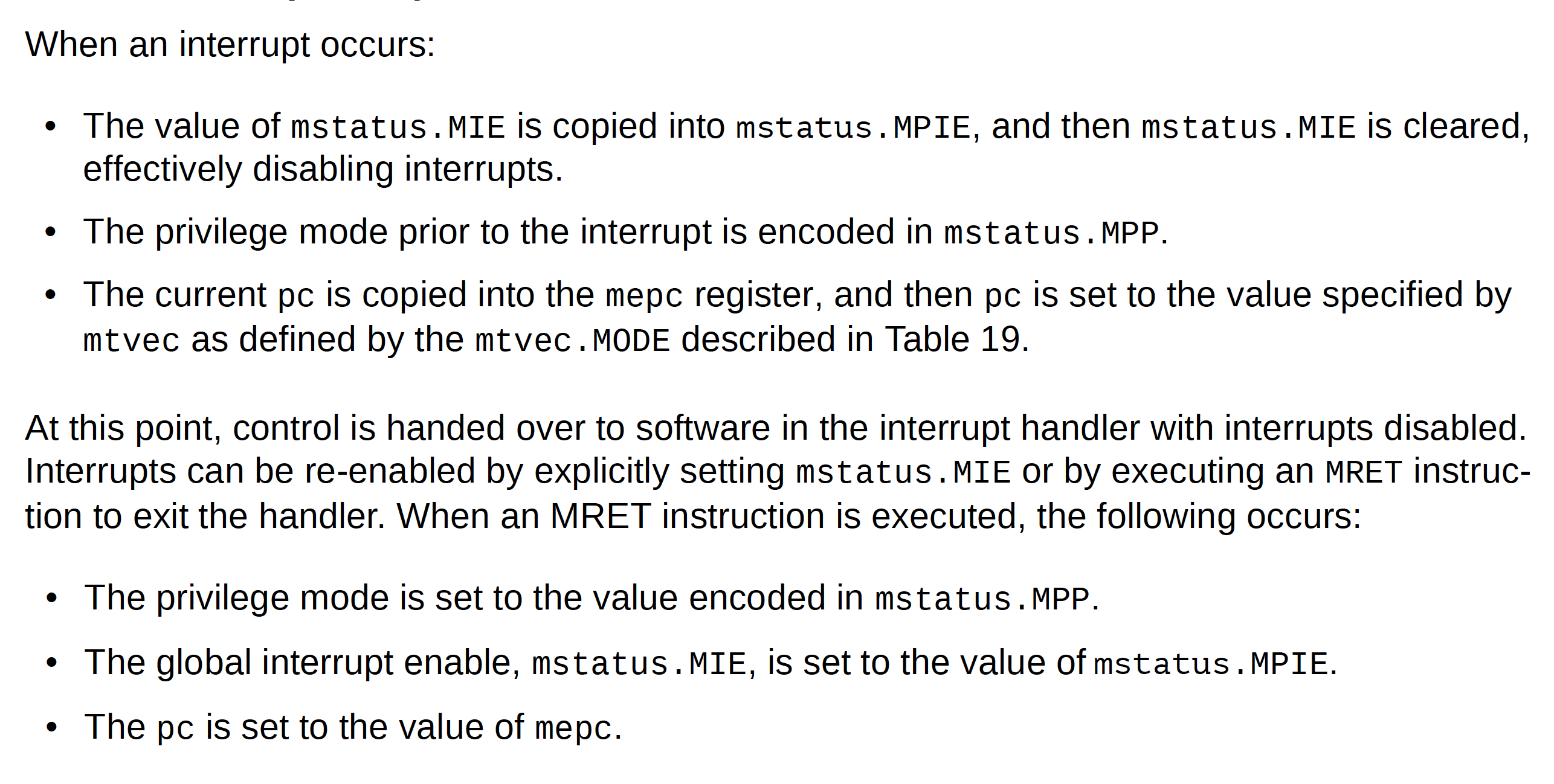
Right before handling a timer interrupt, the CPU assigns the value of its program counter to a CSR called mepc, so mepc will point to an instruction of while(1) before the handler starts to run. Conversely, when the handler invokes mret, the CPU loads the value of mepc back into the program counter, resuming the while loop. Moreover, before the CPU jumps to the handler, interrupts are automatically disabled; when the handler function invokes mret, CPU interrupts will be automatically re-enabled. In other words, we typically hope to handle one interrupt without being interrupted by another.
Below is a screenshot of Chapter 8.2.1 in this CPU document, which describes more details.
TIP
Take your time to read the screenshot above. It is a very important part of how operating systems work. We will revisit this screenshot in P3, especially its descriptions of privilege mode.
Preemptive scheduling
The goal of this project is to help you understand preemptive scheduling, which applies timer interrupts in process scheduling. As mentioned earlier, we do not distinguish between threads and processes for now, so we will use the two terms interchangeably.
The code for timer interrupts in egos-2000 is in earth/cpu_intr.c, which is basically the same as the timer demo program above but registers trap_entry as the handler function. The trap_entry in grass/kernel.s is the starting point of preemptive scheduling.
Save and restore registers
At first glance, most of the code in trap_entry looks similar to the SAVE_ALL_REGISTERS and RESTORE_ALL_REGISTERS in P1. Indeed, the high-level goal is the same: save the values of all general-purpose registers onto the stack when a thread yields, and restore the values when switching back to this thread.
trap_entry:
    csrw mscratch, sp
    li sp, 0x80200000
    addi sp, sp, -128
    SAVE_ALL_REGISTERS    /* Save registers for the current thread. */
    call kernel_entry     /* Pick the next thread. */
    RESTORE_ALL_REGISTERS /* Restore registers for the next thread. */
mretThere are two differences. First, egos-2000 saves the registers on the operating system's stack, which starts from 0x80200000. Specifically, the 128-byte region below 0x80200000 is used to save the registers, indicated by the li and addi instructions above. Since they modify the sp register, the old value of sp is written to a CSR called mscratch and later read back in the SAVE_ALL_REGISTERS part, right before saving its value on the stack.
The second difference is that mret is used at the end of trap_entry instead of ret. In P1, threads need to explicitly call thread_yield, which further calls ctx_switch, so the value of register ra saved on the stack by ctx_switch is an address in thread_yield. With this value of ra, ctx_switch can return to thread_yield simply by calling ret. In P2, threads are preempted by a timer interrupt rather than voluntarily calling a yield function. Therefore, mepc and mret are used to save and restore the program counter.
The kernel_entry highlighted above is in grass/kernel.c, and it does 3 things:
Copy
mepcand the saved registers of the current thread into its process control block, a data structure similar to the thread control block in P1.Pick the next thread by calling
proc_yield, a function similar tothread_yieldin P1.Restore
mepcand the saved registers for the next thread from its process control block.
Process control block
In addition to the mepc and saved_registers highlighted below, the process control block of egos-2000 is defined in grass/process.h, which contains a few other fields:
- a process identifier
pid - a data structure for system calls, which will be explained in P3
- the
statusof a process, which is closely related to the lifecycle of a process
struct process {
    int pid;
    struct syscall syscall;
    enum proc_status status;
    uint mepc, saved_registers[32];
};The lifecycle of a process is illustrated by the enum proc_status in grass/process.h.
enum proc_status {
    PROC_UNUSED,
    PROC_LOADING,
    PROC_READY,
    PROC_RUNNING,
    PROC_RUNNABLE,
    PROC_PENDING_SYSCALL  /* We will explain this one in P3. */
};Specifically, the status in a struct process would experience the following stages:
- When creating a new process, the
statusis set fromPROC_UNUSEDtoPROC_LOADING. This happens in theproc_allocfunction ingrass/process.c. - The
elf_loadfunction inlibrary/elf/elf.cloads the code and data for the process from disk into memory, and then thestatusis set fromPROC_LOADINGtoPROC_READY. We will explain the details ofelf_loadin P4, and you can ignore it for now. - After loading the code and data, the
proc_yieldingrass/kernel.cwill schedule this new process and set thestatusfromPROC_READYtoPROC_RUNNING. - Upon a timer interrupt, the control flow enters
proc_yieldagain, and if it picks another process to run next, thestatusof the current process will be set fromPROC_RUNNINGtoPROC_RUNNABLE. Thestatusthen alternates betweenPROC_RUNNABLEandPROC_RUNNINGbecauseproc_yieldis executed on every timer interrupt. - When a process terminates, the
proc_freefunction ingrass/process.cis called, which sets thestatusback toPROC_UNUSED.
These bullets help you understand the lifecycle of a process. Your first task in this project is to collect statistics on each process's lifecycle.
Collect lifecycle statistics
Add new fields in struct process and update these fields at the right places, so you can collect the following statistics for every process.
- turnaround time: the time between process creation and termination
- response time: the time between process creation and the first time scheduled
- CPU time: the accumulated time that the process is actually running on the CPU
- number of timer interrupts encountered: how many times the CPU control flow transfers from the process code to
trap_entrydue to a timer interrupt
Process creation, termination, and first scheduling correspond to bullet points 1, 5, and 3 in the explanation of process lifecycles above. To measure time, call the mtime_get function twice, and the difference of the two return values is the time elapsed in 10^-7 seconds (on QEMU). Note that mtime_get is also the function used by the timer demo program.
Print the statistics when a process terminates. Note that the ms below is millisecond (10^-7 * 10000 second), and you can simply assume that the numbers printed will not overflow the int type (i.e., you can use %d within printf or INFO).
➜ /home/yunhao echo Hello, World!
Hello, World!
[INFO] process 6 terminated after 0 timer interrupts, turnaround time: 17ms, response time: 13ms, CPU time: 1ms
➜ /home/yunhao ls
./     ../     README
[INFO] process 7 terminated after 0 timer interrupts, turnaround time: 20ms, response time: 16ms, CPU time: 0ms
➜ /home/yunhao loop 500 silent
[INFO] process 8 terminated after 94 timer interrupts, turnaround time: 1188ms, response time: 19ms, CPU time: 1167ms
➜ /home/yunhao loop 500
loop #0
loop #1
...
loop #499
[INFO] process 9 terminated after 0 timer interrupts, turnaround time: 2160ms, response time: 18ms, CPU time: 1506msTIP
Try to explain the different statistics between loop 500 and loop 500 silent. For example, why does loop 500 encounter no timer interrupts and loop 500 silent encounter 94, although the CPU time is close? Note that QEMU can run faster or slower on different machines, so you may see time statistics that differ from the above. The above statistics are generated by running egos-2000 on a MacBook Air (M2, 2022) with QEMU v7.2.5 from xPack.
Multilevel feedback queue
Your final task in this project is to implement the notion of process priority in the scheduler, which is also known as the MultiLevel Feedback Queue (MLFQ) scheduler. Specifically, you need to implement a variant of MLFQ with simple rules:
- There are 5 levels, level #0 to #4. All processes start at level #0 when created.
- Processes at level #i can run on the CPU for
(i+1)*100milliseconds. For example, if a process at level #0 has run on the CPU for more than 100ms, it will move to level #1. After running for another 200ms, it will move to level #2. Since there are 5 levels, all processes at level #4 will remain there and not move down. - The scheduler in
proc_yieldshould always choose a runnable process with the lowest level number (i.e., highest priority) as the next process. - Every 10 seconds or so, the scheduler in
proc_yieldshould move all processes to level #0. In addition, if there is keyboard input for the shell, moveGPID_SHELLto level #0.
Some definitions for MLFQ have been provided in egos-2000:
#define MLFQ_NLEVELS          5
#define MLFQ_RESET_PERIOD     100000000         /* 10 seconds */
#define MLFQ_LEVEL_RUNTIME(x) (x + 1) * 1000000 /* e.g., 100ms for level 0 */

void mlfq_update_level(struct process* p, ulonglong runtime) {
    /* Your code goes here. */
}

void mlfq_reset_level() {
    if (!earth->tty_input_empty()) {
       /* Your code goes here. */
    }
    static ulonglong MLFQ_last_reset_time = 0;
    /* Your code goes here. */
}You can implement the MLFQ scheduler by implementing the two functions above and calling these functions in proc_yield. Specifically, add new fields to the struct process recording the level and the remaining runtime at that level. Suppose a process p has run for another runtime unit of time: mlfq_update_level updates the new fields according to rule #2. When providing the runtime argument, reuse your CPU time measurement.
The mlfq_reset_level function moves all processes to level #0 according to rule #4. Use earth->tty_input_empty() to see whether the shell gets new keyboard input, and use the MLFQ_last_reset_time variable to check whether MLFQ_RESET_PERIOD time units have elapsed since the last time moving all processes to level #0.
Lastly, you need to modify the for loop in proc_yield() according to rule #3. Make sure to call proc_try_syscall() for processes with status PROC_PENDING_SYSCALL, as in the current code. After you finish, test your code with the shell commands below.
> make qemu
...
[CRITICAL] Welcome to the egos-2000 shell!
➜ /home/yunhao loop &
[INFO] process 6 running in the background
➜ /home/yunhao loop &
[INFO] process 7 running in the background
➜ /home/yunhao ls
./     ../     README
➜ /home/yunhao killall
➜ /home/yunhao ls
./ ../ READMEYou can certainly run the commands above with the current scheduler and with your MLFQ scheduler. With the current scheduler, the first ls would take a long time because this ls is interleaved with the background loops. After the killall, ls would become fast again. With your MLFQ scheduler, the two background loops should quickly move to lower priority, so the first ls should be fast just like the second ls. Confirm such an improvement made by MLFQ using the turnaround time printed when ls terminates.
Accomplishments
You have started learning about control and status registers, which are key CPU support for operating systems. You will see more CSRs in the next few projects. You have also finished reading earth/cpu_intr.c, grass/kernel.s, and half of grass/kernel.c in egos-2000.